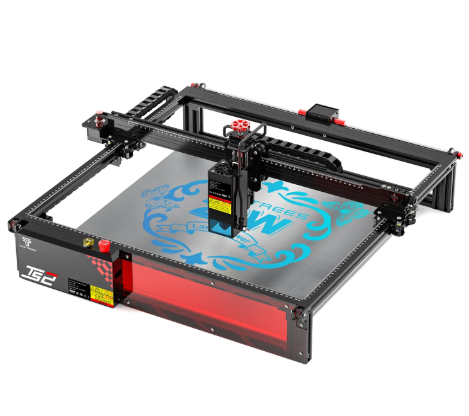
The line between professional manufacturing equipment and desktop maker tools continues to blur. Modern workshops no longer require multi-room industrial footprints to produce intricate 3D components, micro-engravings, or custom-cut prototypes.
Twotrees has systematically expanded its hardware portfolio to cover both ends of the fabrication spectrum. Whether you need complex, multi-sided machining for mechanical prototypes or a portable, plug-and-play unit for rapid surface etching, understanding where these tools fit in your workflow is key to optimizing your workshop.
The Fabrication Spectrum: Multi-Axis vs. Micro-Laser
When selecting a machine for detailed work, your choice depends on two primary factors: motion geometry (3-axis vs. 5-axis) and the removal method (mechanical cutter vs. thermal photon beam).
[Design File / Model] ───┬───> 5-Axis Motion (Rotational & Spatial) ──> Physical 3D Milling
│
└───> 2-Axis Photonic Thermal Beam ─────────> Precise Surface Etching
- Multi-Axis CNC Milling: Moves a rotating end mill along linear (X,Y,Z) and rotational (A,B,C) axes simultaneously. This allows you to machine complex 3D geometry, overhangs, and undercuts in a single setup without manually repositioning the stock.
- Compact Laser Engraving: Uses a focused blue diode laser module to mark, burn, or vaporize surface layers on flat or low-profile objects. It operates silently without physical force, removing the need for heavy stock clamps or spoilboard holding systems.
Machine Comparison: Advanced CNC vs. Portable Laser
To see how these technologies compare for fine-detail applications, review the operational differences below:
| Feature / Metric | Industrial Desktop 5-Axis CNC | Compact Diode Laser Engraver |
| Primary Workflow | Subtractive 3D sculpting & multi-sided milling | Surface marking, image engraving, light cutting |
| Degrees of Freedom | 5 Axes (X,Y,Z + dual rotational axes) | 2 Axes (X,Y planar travel) |
| Material Capabilities | Aluminum, brass, hardwoods, engineering plastics | Wood, leather, paper, acrylic, coated metals |
| Setup Complexity | Higher (CAM toolpaths, 5-axis indexing, zero-point stock) | Low (Drag-and-drop vector/raster images) |
| Tool Wear / Consumables | End mills, carbide bits, coolant/lubricants | Long-life diode laser modules (minimal wear) |
| Physical Footprint | Sturdy chassis, heavier desktop workspace | Ultra-compact, portable desktop or tabletop fit |
Advanced 3D Machining: Complex Geometry Without Manual Repositioning
For engineers, horologists, and mechanical prototyping shops, standard 3-axis CNC machines present a challenge: machining complex 3D shapes often requires stopping the job, manually flipping the stock, and re-zeroing the axes. This process can introduce indexing errors and alignment flaws.
Integrating a 5-axis CNC machine into your production setup solves this by rotating the workpiece dynamically. By bringing the tool bit into contact with up to five sides of a part in a single continuous job, you can craft:
- Complex turbine impellers and curved pump blades
- Custom mechanical joints, gears, and interlocking enclosures
- Intricate 3D relief jewelry molds and detailed miniatures
Because multi-axis machining cuts along dynamic angles, it eliminates tool chatter, improves surface finishes on compound curves, and drastically reduces manual indexing time.
Rapid Personalization: Compact Desktop Marking
On the other end of the workshop spectrum is rapid surface personalization. When your project involves marking serial numbers, custom logos, leather branding, or photo engraving onto flat components, setting up a heavy CNC mill is unnecessary.
Using a compact laser engraver gives makers an accessible, clean, and portable solution. These mini-engravers occupy minimal bench space and integrate cleanly into small desktop work areas.
[Import Image / Logo] ──> [LightBurn / Mobile App] ──> [Laser Etch Surface] ──> Finished Product
Ideal Applications for Mini Lasers:
- Leather & Textile Crafting: Etching custom branding patches, wallets, and keychains without tearing delicate fibers.
- Woodworking Accents: Adding high-contrast vector art, QR codes, or text onto finished wooden boxes and trays.
- Coated Metal Marking: Vaporizing paint or anodized coatings from aluminum tags, tool handles, and decorative plates.
See also: How Intelligent Systems Improve Business Outcomes
Choosing the Right Tool for Your Creative Goals
When deciding which direction to expand your desktop workspace, align your purchase with your core output:
- Invest in 5-Axis CNC Milling if: You manufacture complex functional prototypes, work heavily with non-ferrous metals or hard plastics, and require full 3D spatial geometry that a flat 2D/3D table cannot deliver.
- Invest in a Compact Laser Engraver if: Your focus is on fast customization, small craft runs, portable event setups, or marking finished goods with precise vector graphics and raster photos.
Combining multi-axis milling capability with laser surface etching creates a complete desktop manufacturing pipeline—allowing you to shape structural parts from raw stock and apply custom branding all in one shop.
